
Most companies will happily help you pick components, assemble the rig, install Windows, and ship the finished computer to your door. There is absolutely nothing wrong with that. In fact, for the average consumer, that's enough. But if you've ever wondered why two gaming PCs built with identical hardware can feel completely different to use, the answer is found in everything that happens after the screws are tightened.
That's where my process as a bespoke gaming PC builder in Ireland begins.
When a customer orders a custom rig from AnderMaxPC, I don't see my job as simply snapping components together. Modern PC hardware is essentially high-end adult Lego — with enough patience and a YouTube tutorial, almost anyone can assemble it.
Building a PC is one thing. Engineering a system that maintains consistent frame pacing, silent operation and rock-solid stability after a six-hour gaming session is something else entirely. My goal is to take that raw silicon and tune it into a highly responsive, properly optimised machine that performs exactly the way the hardware engineers intended.
It Starts With a Conversation, Not a Parts List
A lot of clients come to me with a rough idea of what they want. Sometimes they know exactly which GPU they're after. Other times, they simply have a budget and want the highest FPS and the best possible gaming experience for their money.
Most buyers only look at the big, flashy average FPS numbers. But as a specialist, I know that true smoothness is found in the 1% lows (the absence of micro-stutters and harsh frame drops), and that is the metric I focus on when engineering a system.
Two people can have the exact same budget and walk away with completely different builds. A competitive esports player running a 240Hz or 360Hz monitor has entirely different latency priorities compared to someone playing cinematic, story-driven games at 4K. A university student needing a brute-force workstation by day and a gaming rig by night has completely different thermal and memory requirements. That's why I never start with a generic shopping list.
When people search for a local custom PC builder, they're looking for genuine consultancy. Before recommending a single piece of kit, I need to know how the machine will actually be driven:
- What specific titles and game engines do you spend the most time in?
- What monitor resolution and refresh rate are you pushing?
- Are we prioritising maximum raw FPS, aggressive thermal limits, near-silent acoustics, or a perfectly balanced sweet spot?
The answers dictate every hardware decision that follows.
Choosing Components Is More Nuanced Than People Think
One of the most frustrating mistakes I see is people buying hardware simply because a massive tech channel or a Reddit thread labelled it the "best" option. The "best" component in a vacuum can be completely wrong for your specific workload.
I remember a friend who dropped nearly €1,000 on a flagship enthusiast motherboard. When I asked him why he chose it over a perfectly capable €250 board with solid VRM thermals, his answer was simple: "Because it's the best board, isn't it?"
Not necessarily. That massive VRM array didn't give him a single extra frame per second. It didn't improve his system latency. It simply ate a chunk of budget that should have been redirected into a higher-tier graphics card or a better processor. The most expensive component is rarely the smartest choice. I've seen top-tier CPUs handicapped by high-latency memory kits, and customers ready to spend hundreds because marketing convinced them "more expensive" equals "more FPS."
My approach is entirely different. I don't build PCs around marketing brochures; I build them around real-world benchmarks and actual silicon behaviour. Sometimes that means investing heavily in a specific component. Often, it means saving money on the motherboard and storage to bump the GPU up a full performance tier.
Once the final spec is agreed, I begin sourcing. I'm not tied to a single distributor or a warehouse of old stock. A specific GPU might be €70 cheaper from a German retailer. Two RAM kits with identical specs on the box might use entirely different underlying memory dies (SK Hynix vs. Samsung), resulting in drastically different tuning potential. These granular details never show up on a standard quotation, but they are exactly what elevates a PC from "good enough" to brilliant.
The Build Process Is Just the Baseline
Once the hardware arrives, most people assume the hard work is done. In reality, we're just getting started.
Physical assembly, meticulous cable management, optimal fan orientation and premium thermal interface materials are baseline expectations. A clean build isn't just about aesthetics; positive-pressure airflow dictates core temperatures, which directly impacts how aggressively your CPU and GPU can boost.
But before we even install the OS, there's an architectural recommendation I make to almost every client.
Why I Heavily Recommend Dual NVMe Storage
If the budget permits, I consistently recommend configuring the system with two separate NVMe SSDs. Drive A is dedicated exclusively to the Windows operating system and core background services. Drive B is your dedicated gaming and heavy application vault.
Why? Modern AAA games are constantly streaming massive high-resolution textures, shaders and assets directly from storage. Meanwhile, Windows is notorious for running background telemetry, indexing, updates and security scans.
By physically separating these workloads across two different PCIe controllers, we eliminate I/O contention. The OS can thrash its drive all it wants without ever interrupting the data stream to your GPU. This drastically reduces micro-stutters, keeps the operating system highly responsive and makes future OS formats or upgrades incredibly straightforward.
Is it absolutely essential? No. Will the average user notice it on day one? Probably not. But having optimised and benchmarked hundreds of systems, it's a standard I stand by because it delivers a much smoother, more resilient computing experience over the lifespan of the machine.
Firmware, Silicon Tuning and The Validation Gauntlet
Once the physical build is complete, the cable management is pristine and the drives are sorted, we enter the BIOS. This is where the machine is truly woken up, and where the real engineering happens.
Plugging in the hardware and installing Windows is easy. Factory default settings are famously inefficient — they pump excess voltage into the CPU, generating unnecessary heat and noise. Here is what happens on my test bench before a system is ever considered finished:
Technical Recommendations
BIOS & Firmware Flashing
The motherboard is updated to the latest stable BIOS revision for optimal microcode compatibility, security and memory support.
CPU Tuning & Undervolting
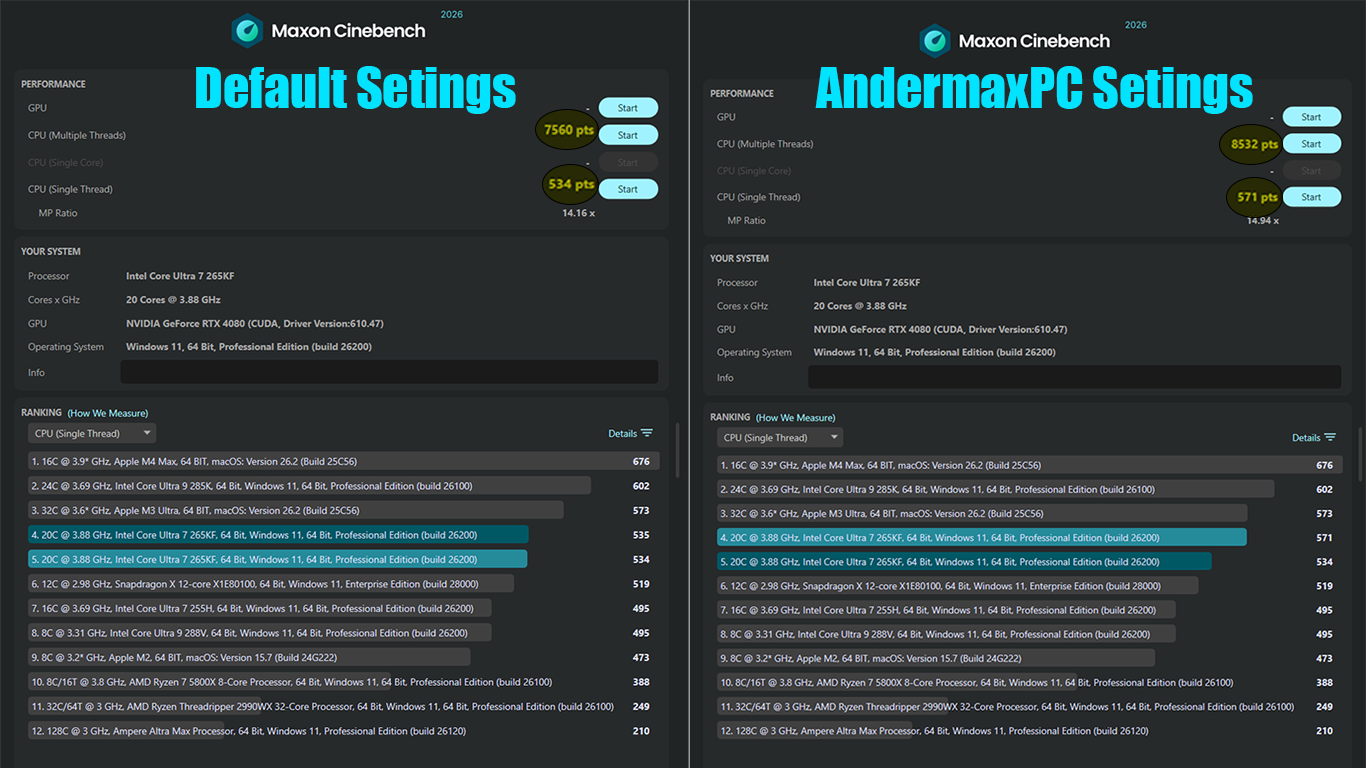
Curve Optimizer and PBO on AMD Ryzen, or PL1/PL2 power limits and voltage offsets on Intel Core. A careful undervolt drops temperatures and power draw, letting the silicon boost higher and hold peak clocks for longer.
Manual Memory Tuning
EXPO/XMP alone leaves performance on the table. Primary and secondary sub-timings are tightened by hand — the single most effective way to lift 1% lows and eliminate traversal stutter.
GPU Optimisation
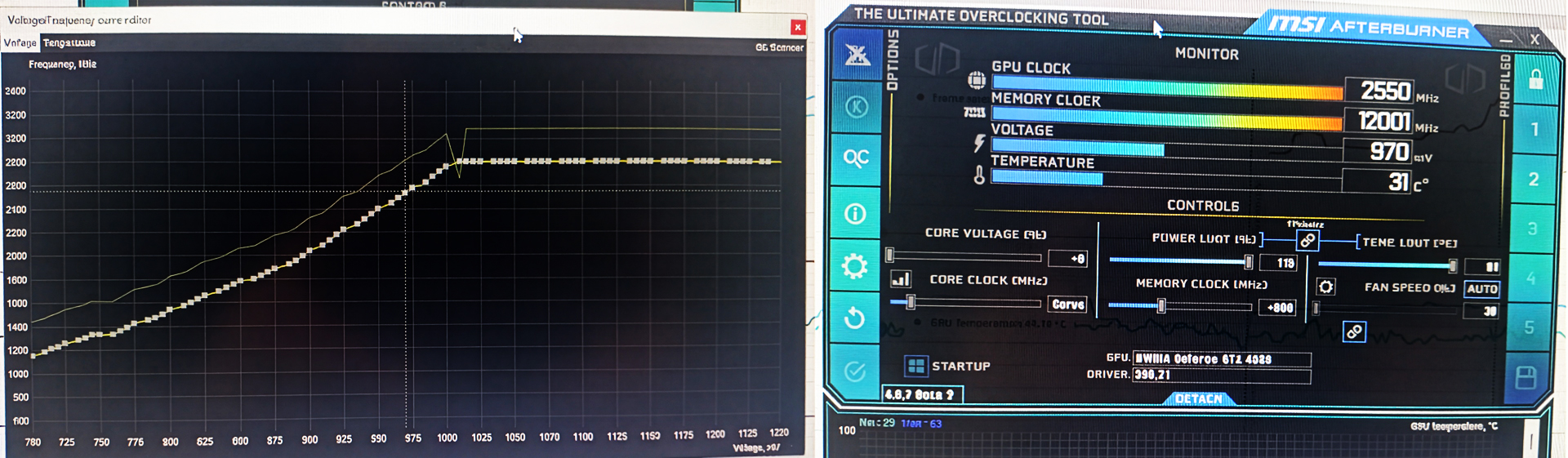
MSI Afterburner is used to tune the voltage/frequency curve, delivering a precise undervolt for near-silent operation and a perfectly flat framerate.
Proving Stability: The Stress Test Gauntlet
A computer isn't considered stable just because it boots into Windows. It has to prove it. Before any machine leaves my workshop, it goes through a brutal suite of diagnostic and stress-testing software. I don't just guess that the system is stable; I force the hardware to its absolute limits.
Stress Test Gauntlet
Memory & IMC
y-cruncher and RAM Test Pro absolutely hammer the memory controller and RAM modules to guarantee zero memory errors.
Thermals & Power Delivery
Cinebench 2026 and OCCT heat-soak the CPU and stress the motherboard VRMs under extreme, unrealistic synthetic loads.
Graphics & System Transients
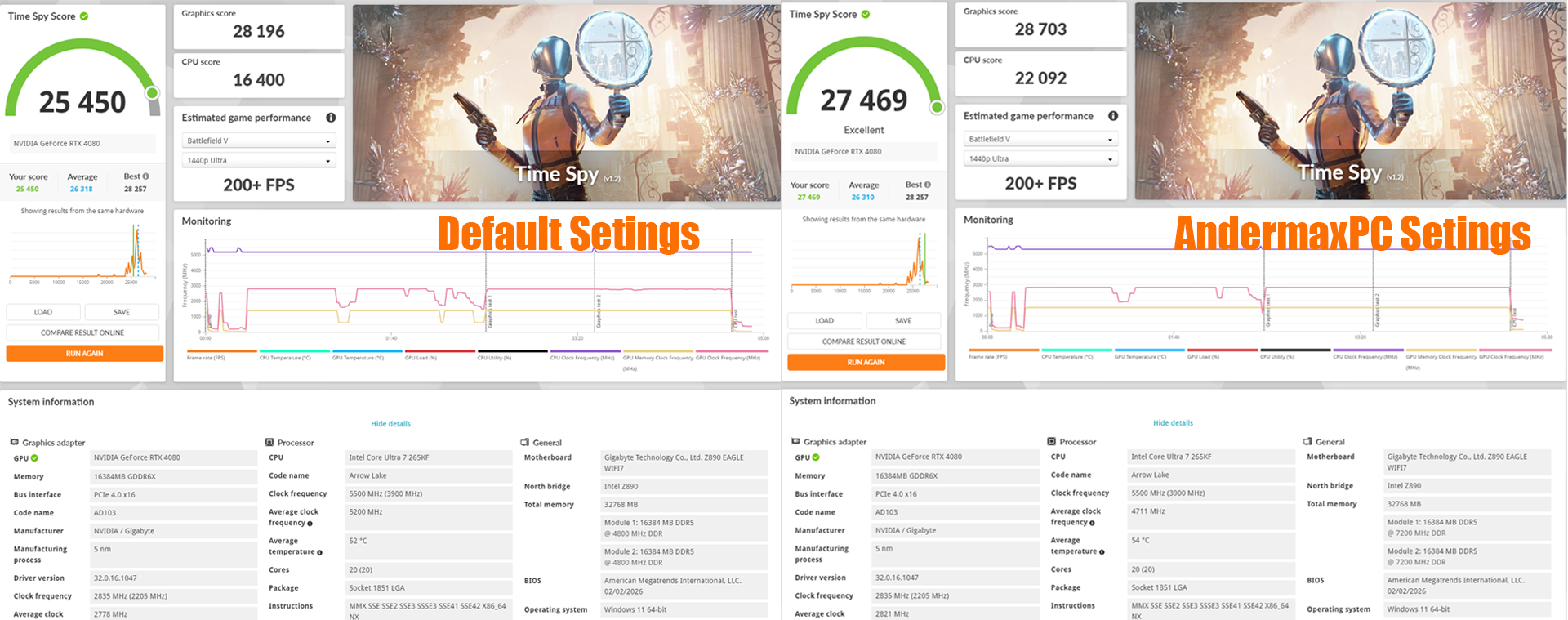
3DMark loops push the GPU to its thermal limit and test the power supply's ability to handle massive transient spikes.
Real-World Gaming Validation
Demanding AAA titles are loaded and monitored live for frame pacing, responsiveness and acoustics under realistic gaming load.
Real-World Gaming Validation
Synthetic numbers mean nothing if the PC crashes or stutters in a real game. The final step is loading up incredibly demanding, heavy gaming titles. I monitor the telemetry in real-time to check for frame pacing consistency, system responsiveness and actual acoustics under a realistic gaming load.
When you receive a custom gaming PC from AnderMaxPC, it's not just a box of expensive parts. It's a finely tuned, rigorously validated and perfectly balanced machine ready to deliver maximum performance from the very second you press the power button.