
When One PC Has to Do Everything.
Why this Intel Core Ultra 7 265KF build made more sense than our original Ryzen 9 9900X plan?
There’s no shortage of custom PCs built with a single purpose in mind. Some are designed to squeeze every last frame out of the latest games, whilst others are built exclusively for demanding professional workloads. This project, however, started with a very different objective. It had to feel completely at home in two entirely different worlds.
For most of the day, this system is used for heavy trading. Multiple browser windows, charting software, market analysis tools, spreadsheets, and communication platforms often run simultaneously across four monitors. Workloads like these rarely push a processor to full utilisation, but they demand something far more important: consistency. Opening another chart, switching between applications, or loading live market data should happen instantly, regardless of whether the system has been running for ten minutes or ten hours.
Once the trading day is over, the computer takes on a completely different role. The client also enjoys modern AAA games and occasionally spends time in virtual reality, so the machine needed enough graphics performance to deliver an enjoyable gaming experience without becoming an unnecessarily expensive flagship build. The challenge wasn't to build the fastest gaming PC available, nor was it to build the most powerful workstation on paper. The challenge was to build one computer that would never feel out of place, regardless of what it was being asked to do. That single objective influenced every decision that followed.
Choosing the Platform.
Every custom PC starts with one fundamental decision: the platform. For this project, the shortlist quickly narrowed down to two processors—AMD's Ryzen 9 9900X and Intel's Core Ultra 7 265KF.
Either one would have made an excellent foundation. The Ryzen 9 9900X remained under serious consideration throughout the planning stage, and I have little doubt that it would have delivered an outstanding experience. The final decision, however, wasn't based on brand loyalty or benchmark charts; it came down to value at the moment the components were purchased. When everything was priced together, the Intel platform offered virtually identical real-world performance for this particular workload whilst reducing the overall build cost by around €300.
That wasn't viewed as a compromise. It was an opportunity to allocate the budget more intelligently. One of the biggest misconceptions in custom PC building is the idea that spending more automatically results in a better computer. It doesn't. More expensive hardware only makes sense when it provides a meaningful benefit for the person who will actually use it. In this case, the money saved by choosing Intel wasn't "lost performance"—it was simply budget that didn't need to be spent, allowing us to optimise other areas of the build.
Why the Intel Core Ultra 7 265KF?
Gaming benchmarks rarely tell the whole story. A trading workstation behaves very differently from a gaming PC. Throughout the day, the processor is handling multiple Chromium-based browsers, trading terminals, spreadsheets, communication software, and dozens of background services. None of these tasks is particularly demanding on its own, but together they create a constant mixed workload where responsiveness matters far more than achieving another ten frames per second in a benchmark.
The Core Ultra 7 265KF proved to be exceptionally well suited to this type of work. Its strong single-thread responsiveness keeps everyday interactions feeling immediate, whilst its multi-core performance provides plenty of headroom for sustained multitasking throughout the day. When work is finished, it still has more than enough performance available for demanding games. Platform maturity also played an important role. By the time this system was being planned, Intel's LGA1851 ecosystem had matured considerably. Motherboard availability was excellent, BIOS updates had addressed the usual launch-day issues, and the platform had become something I felt completely comfortable recommending for a workstation expected to spend long days under continuous use.
Building Around the Platform.
Once the processor had been chosen, selecting the remaining core components became significantly easier. The Gigabyte Z890M AORUS Elite WiFi7 Ice wasn't selected because it had the longest list of features. It was selected because it offered exactly what this project required: a strong VRM design, PCIe 5.0 support, WiFi 7, excellent connectivity, and a straightforward BIOS. Nothing more, nothing less. Motherboards rarely receive much attention once a computer has been completed, but they're one of the most important components in the entire system. A good motherboard isn't something you notice every day; it's something you stop thinking about because it simply does its job reliably.
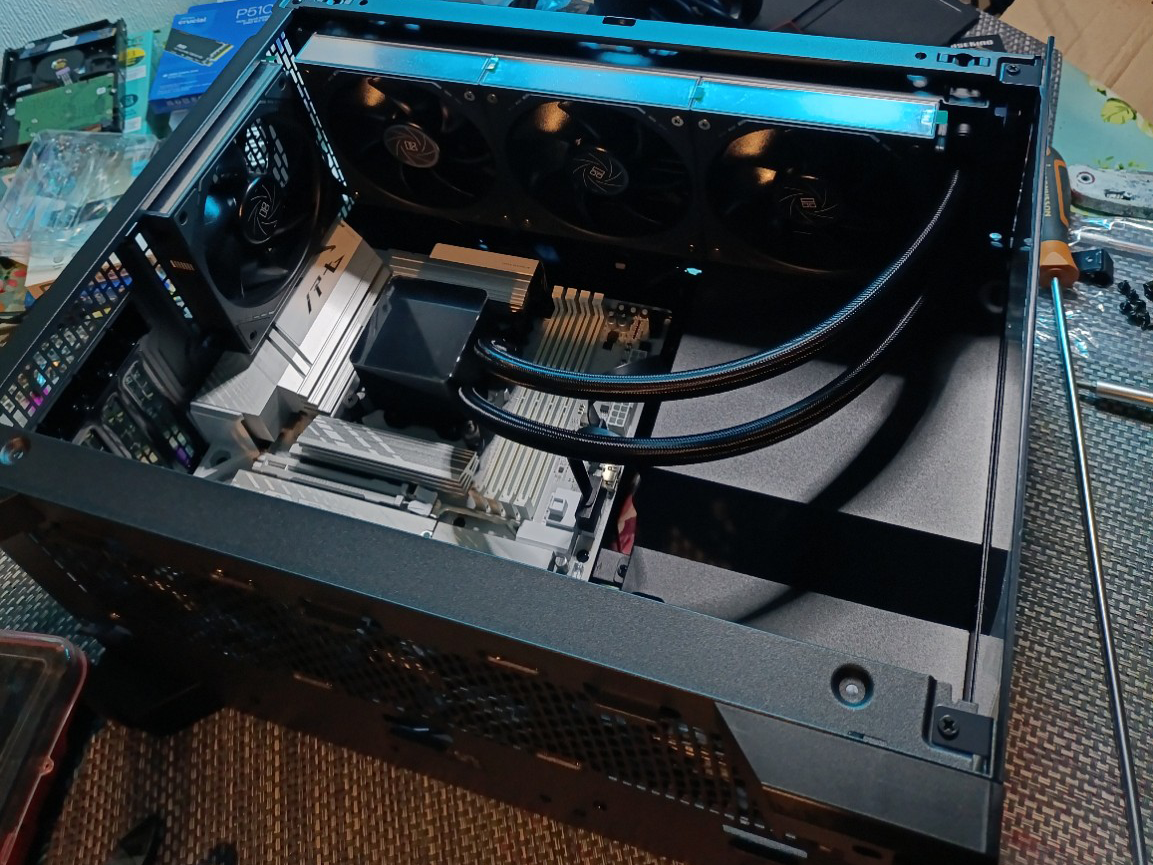
Another decision made surprisingly early had nothing to do with performance. The client simply didn't want a huge PC case dominating the desk. With four monitors already occupying most of the available workspace, adding a full-sized tower would have made the setup feel unnecessarily bulky. A micro-ATX platform allowed us to build a significantly more compact system without sacrificing any functionality. Sometimes choosing a smaller motherboard isn't about saving money—it's about making the entire workspace more comfortable to use every single day. As an added bonus, the white PCB perfectly complemented the clean aesthetic of the build without ever being the primary reason for choosing the board.
Memory Isn't Just About Capacity.
One of the questions I get asked most often is whether 64 GB of RAM is really necessary. If this computer had been built purely for gaming, my answer would probably have been different; for most modern games, 32 GB is already more than enough.
This system, however, spends most of its life doing something entirely different. Trading platforms, charting software, spreadsheets, multiple Chromium-based browsers, communication tools, and countless background applications consume memory surprisingly quickly. Individually they aren't particularly demanding, but collectively they are. The goal wasn't simply to build a system that avoided running out of memory. The goal was to build one that never even came close.
Keeping plenty of free memory available means Windows has far less reason to start moving data between RAM and storage during long working sessions. The result isn't a dramatic benchmark improvement; it's something much more valuable. The computer continues feeling just as responsive at the end of the day as it did at the beginning. The Crucial Pro DDR5-6400 kit represented exactly the right balance. Could lower latency memory have produced slightly better benchmark numbers? Absolutely. Would the client have noticed the difference during everyday use? Almost certainly not. Capacity and stability were simply more important than chasing another one or two percent in synthetic testing.
Why Two SSDs Instead of One?
At first glance, installing two separate NVMe SSDs may seem unnecessary. Modern solid-state drives are incredibly fast, and for many users, a single large SSD would work perfectly well. This build, however, wasn't designed around "good enough".
Every computer that leaves my workshop goes through a full Windows optimisation process before it reaches its new owner. Unnecessary Microsoft applications are removed, telemetry is reduced wherever possible, startup behaviour is cleaned up, and background activity is minimised. Even after all of that, Windows remains Windows. The operating system continues indexing files, running maintenance tasks, checking for updates, writing logs, and performing countless background operations that most users never notice.
Rather than allowing those processes to compete with the client's own workload, I prefer to separate them. The operating system is installed on a dedicated Crucial P310 500GB NVMe SSD, whilst trading software, everyday applications, games, and personal data live on a separate KLEVV CRAS C925G 2TB NVMe SSD. This approach doesn't magically make Windows faster, nor does it eliminate every possible delay. What it does do is reduce storage contention. System activity remains largely isolated from the software the client is actively using, helping maintain consistent responsiveness during long working sessions. It's a relatively small design decision, but one that contributes to a machine that feels predictable and responsive every single day.
Graphics Performance Beyond the Office.
Unlike the processor, selecting the graphics card had very little to do with trading, as modern trading software places almost no meaningful load on a GPU. The graphics card was chosen for everything that happens after the markets close.
The client wanted a system capable of handling modern AAA games while also delivering an enjoyable VR experience without compromise. The ASUS Prime GeForce RTX 5070 OC 12GB turned out to be the ideal fit. It offered an excellent balance of performance, efficiency, and cost for this particular project, providing more than enough grunt for virtual reality while avoiding the significant price premium of higher-tier flagship models. Equally importantly, this particular card represented excellent value at the time the components were purchased. Hardware recommendations should never exist in isolation; they must reflect both the intended workload and the reality of the market at the time the build is planned.
Cooling, Power, and the Details That Matter.
Reliable computers are rarely defined by a single impressive component; they're defined by the way every component works together.
The Enermax LIQMAX IV 360mm AIO wasn't selected simply to achieve lower temperatures. A larger radiator allows the cooling system to dissipate heat more efficiently, which means the fans don't need to work as hard under sustained loads. The result is a quieter computer that maintains consistent boost behaviour without unnecessary noise.
The Thermaltake Toughpower GT 850W was selected for equally practical reasons. With full ATX 3.1 support, native compatibility with modern graphics cards, and enough capacity for future upgrades, it provides a stable foundation without introducing unnecessary complexity. Housing everything is the Phanteks XT V3 mATX, a case that strikes an excellent balance between airflow, build quality, and compact dimensions. It reinforces the original objective of this project: creating a powerful workstation that integrates naturally into the client's workspace instead of dominating it. Together, these choices create a computer that should remain quiet, reliable, and enjoyable to use for many years.
Final Thoughts.
Could this system have been built differently? Absolutely. A Ryzen 9 9900X would also have made an excellent workstation. A different graphics card could have produced similar results, and even the storage configuration could have been approached in other ways.
That's the nature of custom PC building—there is rarely only one correct answer. The real challenge isn't finding good components. It's understanding how the computer will actually be used, then selecting the combination of hardware that makes the most sense for that specific workload, that specific client, and that specific moment in time. Every build is different because every client is different.
That's why I never begin with a list of components. I begin with a conversation. Once I understand how the system will be used, choosing the hardware becomes surprisingly straightforward. To me, that's what custom PC building has always been about. Not brand loyalty. Not marketing. Not blindly chasing benchmark numbers. It’s about understanding the problem first, designing the solution second, and only then choosing the hardware.
That's the difference between merely assembling a computer and truly designing one.
System Specifications:
Processor Intel Core Ultra 7 265KF
Motherboard Gigabyte Z890M AORUS Elite WiFi7 Ice
Graphics Card ASUS Prime GeForce RTX 5070 OC 12GB GDDR7
Memory Crucial Pro DDR5 64GB (2×32GB) DDR5-6400 CL40
System Drive (OS) Crucial P310 500GB PCIe 4.0 NVMe
Data Drive (Apps/Games) KLEVV CRAS C925G 2TB PCIe 4.0 NVMe
CPU Cooler Enermax LIQMAX IV 360mm AIO Liquid Cooler
Case Phanteks XT V3 mATX
Power Supply Thermaltake Toughpower GT 850W ATX 3.1